
Billing and accounts
Know who owes what, without the awkward conversations.
Every tenant has one clear account: what they were charged, what they paid and how long anything has been owed. Statements send themselves, late fees apply themselves, and your bookkeeper gets a spreadsheet instead of a shoebox.
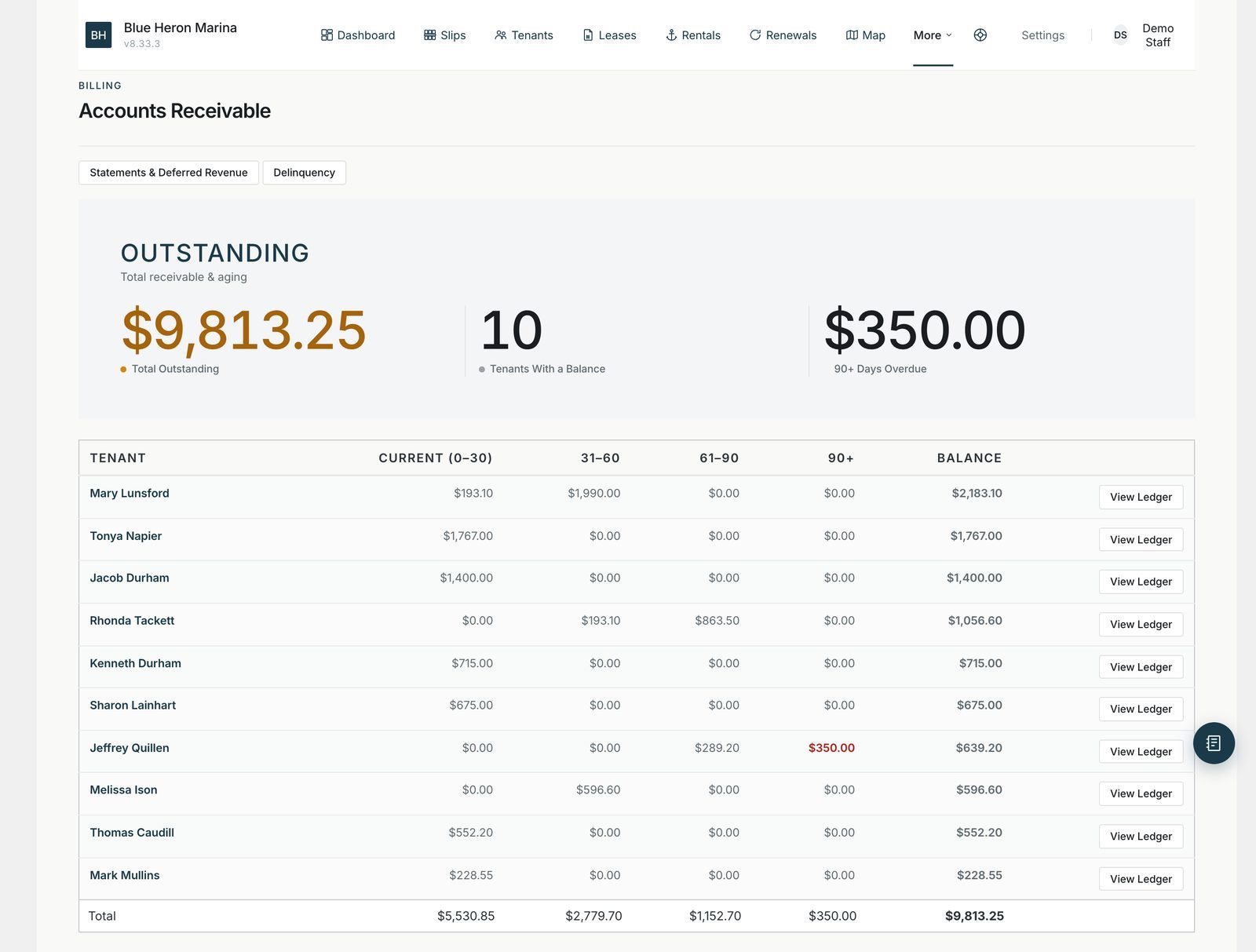
Who owes what, and for how long. Made-up tenants on our demo marina.
Money that drifts.
Late payers rarely mean any harm. But when a balance lives in three places and asking about it is awkward, a few hundred dollars can drift for months.
TODAY
- Who owes what lives in QuickBooks, a shoebox and the owner’s head
- Statements get written by hand, when someone has time
- Late fees get skipped because nobody wants the conversation
- The bookkeeper retypes everything at the end of the month
ON FIELD GUIDE MARINA
- One account per tenant, with a running balance
- Statements to one tenant or everyone, in a click
- Late fees and reminder letters on a schedule you set
- A spreadsheet your bookkeeper can load into QuickBooks or Xero
Every tenant, one clear account.
Record a charge, like winter storage or a pump-out, and a payment when it comes in, by check, cash or card. The account keeps a running balance and shows how long anything has been owed: under 30 days, 30 to 60, 60 to 90, or longer.
Send a statement to one tenant or to everyone at once, and tenants can download their own from the portal any time.
Tenant accounts and statements. 2:55
Late fees that apply themselves.
Nobody likes asking a neighbor for money. Turn on the overdue schedule and Field Guide Marina does the asking, politely and on time, so you don’t have to. It never files anything and it never locks a tenant out. Those decisions stay with you.
- ReminderA friendly note once a charge is overdue
- Late feeAdded once, at the amount you set
- Final noticeA firmer letter, on your schedule
- Lien notice draftA letter for your attorney to review
An example schedule. You choose the days and the fee, or leave it switched off.
Your bookkeeper will thank you.
Download the month’s charges and payments as a spreadsheet laid out for QuickBooks or Xero, using your own account numbers. No more retyping at the end of the month.
Renewals and boat rentals paid online go straight to your bank through your card processor, with their own receipts.
Where the money goes
- Renewals paid onlinestraight to your account
- Boat rentals paid onlinestraight to your account
- Checks and cashrecorded on the tenant’s account
- Our cutnone
Included in every Slips package
- Up to 75 slips$249/month
- 76 to 200 slips$349/month
- 201 to 400 slips$499/month
Setup from $1,500. Your website, hosting, email and support are included. No booking fees.
Questions owners ask
- Does it send invoices?
- It keeps an account and sends statements for each tenant, which show every charge and payment and what’s still owed. There are no separate invoices.
- Can tenants pay their balance online?
- Renewals and boat rentals are paid online by card. Other charges are recorded on the account and paid the way you take payments today.
- Does it connect to QuickBooks automatically?
- Not automatically. You download a spreadsheet laid out for QuickBooks or Xero and load it in, usually once a month.
- Will it ever lock out a tenant who owes money?
- No. It reminds, adds the fees you set and can draft a letter for your attorney. Every bigger step is yours to decide.
See your accounts on it.
We’ll show you a tenant’s account, a statement and the overdue schedule on our demo marina.